
56 success criteria · keyboard, screen reader, contrast, forms
A WCAG 2.2 AA audit done by a person, not a score from a machine.
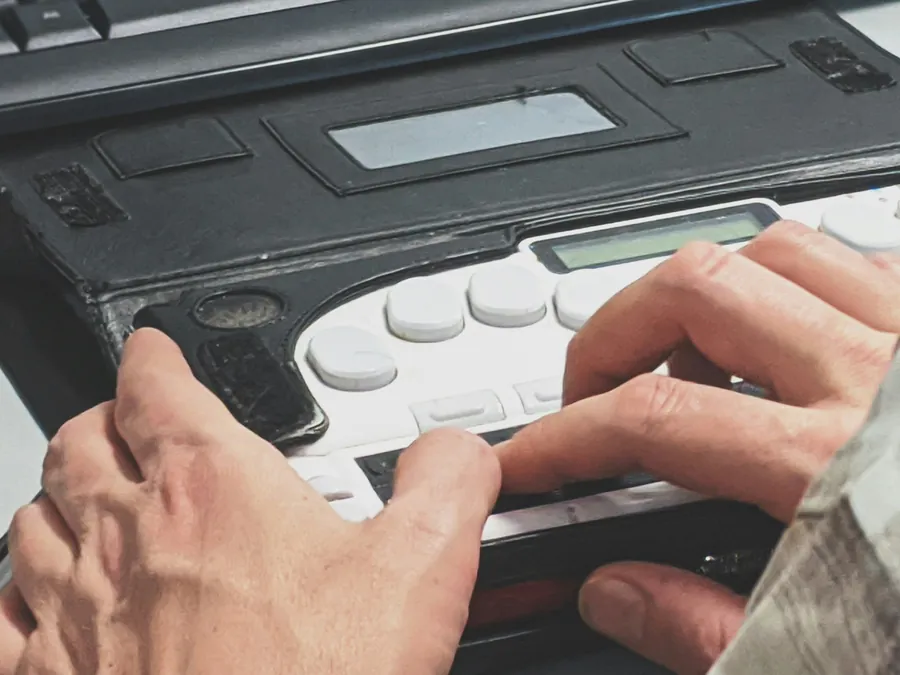
Automated checking finds roughly a third of what is wrong with a website. The rest — the menu that opens only on hover, the modal that keeps the focus, the error message that exists only in red — is found by someone who puts the mouse away and works through the site with a keyboard and a screen reader. That is what this audit is, what it produces, and what it costs.
Seven days free, no card. Credentials stay with the tester.
The four principles, and where sites actually break
WCAG organises everything under four principles: content must be perceivable, operable, understandable and robust. It is a good structure for writing a standard and a poor one for predicting failures, because in practice the same handful of mistakes appear on almost every site we open, regardless of sector or budget.
Perceivable
Images without meaningful alternatives, video without captions, text placed over photographs at contrast ratios that collapse on a bright screen, information carried by colour alone.
Operable
Keyboard traps in modals and cookie banners, custom dropdowns unreachable without a mouse, carousels that cannot be paused, focus that disappears entirely under a sticky header.
Understandable
Form fields labelled only by placeholder text, errors that do not say what to change, a language attribute that claims English on a German page, navigation that reorders between templates.
Robust
Components built from unnamed div elements, ARIA applied in ways that contradict the visible state, live regions that announce everything or nothing.

What WCAG 2.2 added, and why it matters now
Version 2.2 arrived in October 2023 and added nine criteria at A and AA. They are unusually practical, because they describe patterns that became common after 2018 and that older versions simply did not anticipate.
| Criterion | Level | What it asks for | Where it usually fails |
|---|---|---|---|
| Focus not obscured | AA | The focused element stays at least partly visible | Sticky headers and cookie bars covering the focused field |
| Dragging movements | AA | A single pointer alternative to any drag | Sliders, kanban boards, map controls, image comparisons |
| Target size (minimum) | AA | Interactive targets of at least 24 by 24 pixels | Icon-only buttons and dense mobile toolbars |
| Consistent help | A | Help mechanisms in the same relative order across pages | Chat widgets and contact links that move between templates |
| Redundant entry | A | Information already given is not asked for again | Multi-step checkouts repeating the same address fields |
| Accessible authentication | AA | No cognitive function test without an alternative | Login puzzles, transcription captchas, memory-based steps |
If your last audit was written against 2.1, it did not look at any of this. That alone is a reason to re-test before quoting conformance in a tender.
How the audit runs, day by day
- Day one, scope. We agree the templates and flows to cover, receive any credentials, and run the automated pass so the obvious defects are already listed before a person starts.
- Day two, keyboard. The entire journey is driven from the keyboard alone: tab order, focus visibility, skip links, menus, modals, tables, the checkout or booking path from first click to confirmation.
- Day three, screen reader. The same journeys with assistive technology: names and roles of controls, headings and landmarks, form labels and error association, live regions, the reading order against the visual order.
- Day four, visual and structural. Contrast in every state including hover and focus, zoom to 400%, reflow at 320 pixels, text spacing, motion and time limits, orientation, and the target size rules new to 2.2.
- Day five, writing. Findings written by criterion with severity and remedy, statement drafted from those findings, signature, verification code, delivery.


How findings are graded
A list of two hundred issues with no order is not useful to a development team. Every finding carries a severity, and the severity is about the user, not about how hard the fix is.
| Severity | Meaning for the user | Typical example | When to fix |
|---|---|---|---|
| Blocking | The task cannot be completed at all | Checkout button unreachable by keyboard | Immediately |
| Serious | The task is possible but unreliable | Errors announced only by colour | Within the sprint |
| Moderate | Extra effort, confusion, lost time | Headings skipping levels across a long page | Next release |
| Minor | Noticeable but not obstructive | Decorative image with redundant alternative text | When convenient |
The statement that follows the audit reflects this honestly. If blocking issues remain open at signature, the document says so and describes the alternative available to users meanwhile, which is exactly what Annex V of the European Accessibility Act expects and what the EAA page explains in more detail.
Who asks to see this document
Three audiences, three reasons, one report.
Public buyers
Tender questionnaires in the UK and across the EU ask for a WCAG conformance report with a date and a signature. An undated self-assessment is usually scored as missing.
Enterprise procurement
Large customers pass their own obligations down the supply chain. A supplier who can produce a signed report closes the question in one email.
Authorities and complainants
When a complaint arrives, the useful answer is evidence of testing with dates, not a promise of commitment.
In Ontario the same testing feeds the compliance record described on the AODA page; federally regulated organisations will find the parallel duties on the Accessible Canada Act page; in Britain the procurement route is set out on the UK page.

What the audit does not cover
Saying this clearly is part of the service, because a report that overstates its scope is worse than no report at all.
- We do not modify your code. The remedies are described precisely; the implementation belongs to your team or your agency.
- We do not test native mobile applications under this plan. That is separate guidance and separate work.
- We do not remediate PDF documents, although we flag them when they carry part of the service.
- We do not run user testing sessions with participants with disabilities as part of the standard audit.
- We do not certify on behalf of any authority. No private company anywhere does, whatever the badge suggests.
Everything else in the plan is included: the audit, the statement, the feedback channel, the monthly re-test, five years of records and the public verification code.
Two questions we are asked before every audit
Our developer says the site is already accessible
That is often said in good faith, and sometimes true for the pages the developer built. It is rarely true for the whole product, because a site is not only its templates: it is the cookie banner supplied by a vendor, the booking widget embedded from a partner, the document uploaded by marketing last week, the carousel added for a campaign and never removed. An audit covers all of it, including the parts nobody remembers owning. If the result confirms your developer, you have gained a signed document saying so, which is worth more in a tender than an internal opinion.
Can we fix everything first and audit afterwards
You can, and some teams prefer it. The risk is spending a quarter fixing what an automated tool flagged while the blocking issues stay untouched, because tools do not rank by user impact. Auditing first gives you an ordered list: the blocking items to fix this month, the moderate ones for the next release, the rest tracked. Most teams find that cheaper than a broad refactor that still misses the keyboard trap in the checkout.

What happens to the findings after delivery
A report that is read once and filed has not changed anything. The plan is built so the findings keep working after the invoice is paid.
Each month the site is tested again automatically, and the result is compared with the previous run. When a new barrier appears, and new barriers appear constantly on sites that ship weekly, you are told which page, which criterion and which release introduced it. When a barrier is fixed, it disappears from the open list and the statement is re-issued with the new date, so the public document keeps describing the site as it is rather than as it was on the day of the audit.
Over a year this produces something more useful than a single report: a dated history of what was tested, what was found, what was fixed and when. If an authority writes, or a customer challenges a claim in a tender, that history is the answer, and it is retrievable for five years without asking us to reconstruct anything.
Audit questions, answered plainly
What is a WCAG 2.2 AA audit?
A structured examination of a website against the 56 success criteria that make up level AA of the Web Content Accessibility Guidelines 2.2, carried out partly with software and mostly by a person using a keyboard and a screen reader.
Why level AA and not AAA?
AA is the level referenced by legislation and by procurement across the EU, the UK and Canada. AAA contains criteria that cannot be met by whole categories of content, which is why no law requires it wholesale.
What changed between WCAG 2.1 and 2.2?
Nine new criteria, mostly about focus visibility, dragging alternatives, target size, consistent help and reducing memory load in authentication. They affect modern interfaces more than static pages.
How many pages do you look at?
A representative sample rather than every URL: templates repeat, so testing one instance of each template, plus every unique flow, covers the site without inflating the price.
How long does an audit take?
Five business days from the moment we have the scope and any credentials we need.
What do I actually receive?
A findings report listing each barrier with its criterion, location, severity and remedy, plus the signed accessibility statement built from those findings and a public verification code.
Do you use automated tools?
Yes, as the first pass. Automated checking reliably catches perhaps a third of issues: missing alternative text, some contrast failures, malformed landmarks. The rest needs hands.
Which screen reader do you use?
Testing is done with the combinations users actually run, on desktop and on mobile, because a page can behave differently in each.
Do you test with real users with disabilities?
Our standard audit is expert testing against the criteria. User testing is a different exercise, valuable and separate, and we say so rather than blurring the two.
Can you audit a web application behind a login?
Yes, with test credentials. Application flows are usually where the serious barriers live.
What about a mobile app?
Native apps follow different guidance and are not covered by this audit, which is about web content.
How severe are the findings usually?
On a first audit, most sites have at least one blocking issue: a keyboard trap, an unlabelled control in the checkout, or a form error that is only signalled by colour.
Will you tell me how to fix them?
Yes, at the level of the change to make. We do not write the code for you, and we do not pretend a one-line patch solves a structural problem.
Do you re-test after we fix?
The monthly re-test is included for the duration of the plan, and after a significant fix we re-issue the statement.
How is this different from a free online checker?
A checker returns a score from a machine. An audit returns findings from a person, tied to criteria, and a document a company signs.
What does it cost?
690 € a year for the EU, 1,290 € for three domains and six languages, 890 CAD for Canada, 1,990 € for all three regions. The audit is part of the plan, not a separate invoice.
Is the audit valid for tenders?
It is what buyers usually ask for: a WCAG 2.2 AA report, dated, signed by a named company, with findings attached.
How do we start?
Run the free scan, then order. The scope questions take about ten minutes and testing starts the same day.